
Best gaming microphones for clear team chat and streaming
As an Amazon Associate I earn from qualifying purchases. Some links may earn us a commission at no extra cost to you.
If you want your teammates and stream audience to hear your voice clearly instead of your keyboard, PC fans, and room echo, microphone type and placement matter as much as raw specs.
Dynamic microphones are usually the safer choice for noisy gaming rooms because they work best close to your mouth and tend to capture less of the room. Condenser microphones can sound detailed and open, but placement, gain, and noise control become more important.
These six picks cover premium dynamic audio, budget USB/XLR, feature-rich RGB setups, complete boom-arm kits, compact desks, and software-assisted noise reduction.
Top Picks
1. Shure MV7+ — Best for Noisy Rooms and Voice Clarity

- CUSTOMIZABLE LED TOUCH PANEL: Personalize your setup with a full-color LED touch panel featuring 16.8 million color options, real-time level monitoring, and tap-to-mute control—ideal for livestreams, video calls, and on-camera podcasting
- AUTO LEVEL & REAL-TIME DENOISING: Auto Level Mode intelligently adjusts gain based on distance and volume, while the real-time denoiser reduces background noise, helping you maintain consistent, clean audio in any recording environment
- BUILT-IN REVERB EFFECTS: Add depth and character to your sound with integrated reverb modes, including Plate, Hall, and Studio settings, designed for enhancing vocals, voiceovers, and recordings with a polished, professional finish

The Shure MV7+ is the strongest choice when clean voice pickup matters more than RGB or a low price.
Why it wins: Its dynamic design works particularly well when positioned close to your mouth, helping keep keyboard noise and room reflections farther behind your voice.
USB connectivity keeps the initial setup simple, while XLR provides an upgrade path if you later add an audio interface or mixer.
Pros
- Dynamic design suits noisy gaming rooms
- USB and XLR connectivity
- Strong voice-focused sound
- Good upgrade path
- Suitable for Discord and streaming
- Works well on a boom arm
Cons
- Premium price
- Needs close positioning
- Boom arm is usually preferable to distant desk placement
Trade-offs / Who should skip: Choose the MV7+ if voice clarity and background rejection are your priorities.
Skip it if you want an inexpensive plug-and-play desk mic or regularly sit far away from your microphone.
Scores: Performance 5/5 | Voice Focus 5/5 | Ease of Use 4.4/5 | Value 3.8/5
2. FIFINE AmpliGame AM8 — Best Budget Dynamic for Gaming and Streaming

- [Natural Audio Clarity] Operated with frequency response of 50Hz-16KHz, the podcasting XLR mic delivers balanced audio range, likely to resonate with your audience. Directional cardioid dynamic microphone corded will not exaggerate your voice, while rejects unwanted off-axis noise for vocal originality and intelligibility during your PS5 gaming streaming video recording. (Tips: Keep the top of end-addressing XLR dynamic microphone AM8 facing audio source, and suggested recording range is 2 to 6 in.)
- [XLR Connection Upgrade-Ability] To use XLR connection, connect the podcast microphone to an audio interface (or mixer) using a separate XLR cable (NOT Included) . Well-connected and smooth operation improves audio flexibility to make you explore various types of music recording singing. The streaming mic isolates the pristine and accurate sound from ambient noise with greater no interference and fidelity. (RGB and function key on mic are INACTIVE when using XLR connection.)
- [USB Connection with Handy Mute] Skip the hassle of setting something up and plug the cable to play the dynamic USB microphone directly, which suits for beginner creators or daily podcast. You can quickly control the gamer mic with tap-to-mute that is independent of computer/Macbook programs to keep privacy when live streaming. LED mute reminder helps you get rid of forgetting to cancel the mute. (RGB and function key are only available for USB connection, but NOT for XLR connection)
The FIFINE AM8 brings the close-mic advantages of a dynamic microphone into a much more affordable package.
Why it wins: It combines USB and XLR connectivity with gamer-friendly controls such as mute, gain adjustment, headphone monitoring, and RGB lighting.
For gamers dealing with mechanical keyboards or untreated rooms, its dynamic design is often a better fit than a sensitive condenser sitting several feet away.
Pros
- Dynamic microphone
- USB and XLR
- Tap-to-mute control
- Gain control
- Headphone monitoring
- RGB lighting
- Strong value
Cons
- Needs to stay fairly close to your mouth
- No advanced routing software
- Boom arm can improve positioning significantly
Trade-offs / Who should skip: Pick the AM8 if you want an affordable dynamic mic with room to upgrade later.
Skip it if sophisticated software routing or multiple onboard pickup patterns are priorities.
Scores: Performance 4.5/5 | Voice Focus 4.6/5 | Ease of Use 4.5/5 | Value 5/5
3. HyperX QuadCast 2 S — Best Feature-Rich USB Gaming Mic

- Future Ready Audio: The QuadCast 2 S features best-in-class audio recording resolution on a consumer USB gaming microphone.
- Dynamic Lighting Display: QuadCast 2 S has over 100+ individually customizable aRGB LEDs allowing users to display over 16M+ color options to complement their streams and creations.
- Tap-to-Mute Sensor: The Tap-to-Mute sensor allows users to quickly mute/unmute the mic to manage what is heard.
The HyperX QuadCast 2 S is the feature-heavy option for gamers who want a polished USB setup with easy controls and a strong gaming aesthetic.
Why it wins: Its controls are designed to be adjusted quickly during gaming, and its multiple pickup options make it more flexible than a basic single-pattern USB mic.
It also fits naturally into RGB-focused gaming setups without requiring a separate audio interface.
Pros
- Easy onboard controls
- Multiple pickup patterns
- Gamer-focused USB setup
- RGB lighting
- Convenient mute control
- Stream-friendly design
Cons
- Condenser design captures more room sound than a dynamic
- Large footprint
- Good placement is still necessary to reduce keyboard pickup
Trade-offs / Who should skip: Choose this when convenience, visual design, and flexibility matter.
Skip it for a loud untreated room if maximum rejection of keyboard noise is the main priority.
Scores: Performance 4.5/5 | Voice Focus 4.2/5 | Ease of Use 4.9/5 | Value 4.0/5
4. FIFINE AmpliGame A6T — Best Complete Budget Boom-Arm Kit

- [Right Out-of-the-Box] The plug-and-play gaming microphone set doesn't need additional plug-ins or complicated device setup steps. The USB gamer microphone for PC is compatible with Windows, Mac OS and Mac/PS4/PS5. The streaming microphone end is reversible type-c interface, no trouble to plug the right way in dim game atmosphere. The 8.2ft (2.5m) USB-C to USB-A/C cable is long enough to extend from behind the host to the desktop for clear audio gaming singing recording.
- [Cool Lighting Design] Two-tone automatic gradient RGB makes your PC windows microphone icing on the cake. With soft and coordinated light effects, your game video or live streaming will be more rainbow eye-catching via the USB mic with boom arm. Make your channel stands out from ranking list. If you are just a game player, the rich RGB on the stream microphone for PC matching with your flowing colors computer accessories can meet the needs of more game atmosphere.
- [Easier Function Use] Setting touch-mute button on the top can be easily tapped with one hand, instead of holding the computer microphone for gaming to press a button. Quick mute will not affect your Macbook computer keyboard operation, nor making a ticking sound. The big volume knob control at the bottom of Youtuber microphone makes fine-tuning easier, and you can adjust the volume on the boom stream mic for gaming at will without leaving sights from the game screen.
The FIFINE A6T is one of the easiest ways to get the microphone off your desk and closer to your mouth without buying the boom arm, shock mount, and pop filter separately.
Why it wins: The kit includes a USB condenser microphone, boom arm, pop filter, shock mount, gain control, mute button, and RGB indicator.
That complete setup is particularly useful for gaming because moving the mic closer to your mouth lets you lower the gain, which can help reduce the relative level of keyboard noise and room sound.
Pros
- Boom arm included
- Shock mount included
- Pop filter included
- Gain control
- Mute button
- RGB lighting
- Plug-and-play USB
- Excellent package value
Cons
- Condenser design can still capture room noise
- No XLR upgrade path
- Boom arm requires desk-edge mounting
Trade-offs / Who should skip: Choose the A6T if you want a complete gaming microphone setup without purchasing accessories individually.
Skip it if you specifically want a dynamic microphone or plan to move to an XLR audio interface later.
Scores: Performance 4.4/5 | Voice Focus 4.1/5 | Ease of Use 4.8/5 | Value 5/5
5. COMICA Ejoy UNI S — Best for Compact Gaming Desks
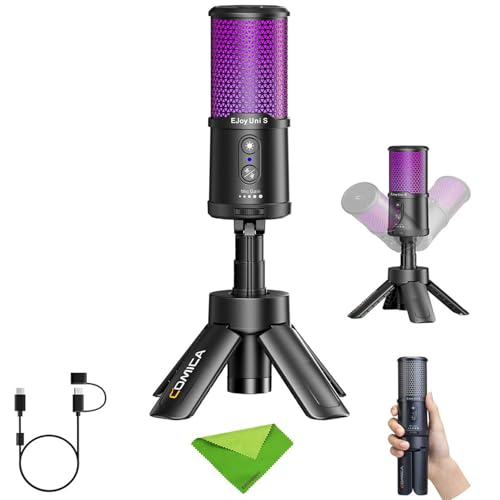
- 【Professional Studio Quality】Being designed with studio-grade sound quality, EJoy Uni S takes a 48 kHz ultra-high sampling rate and 24-bit depth.The cardioid condenser mic capsule accurately picks up the sounds in front of the mic, effectively reducing noise from the sides and back.
- 【Support Gain Control, Monitoring, One-click Muting】The 3.5mm TRS/TRRS monitoring interface supports headphone insertion for real-time monitoring. The mic output gain and monitoring volume can be adjusted via the gain knob. In case of emergency, one-click muting prevents unexpected audio recording.
- 【One-click CalMix Al Denoise】Eauipped with Comica's self-developed CallMix Al denoise algorithm, it can accurately identify human voices and filter out ambient noise.
The COMICA Ejoy UNI S is the compact option for gamers who do not want a large boom-arm microphone dominating their desk.
Why it wins: Its USB cardioid condenser design, included tripod, and compact format make it easy to fit around a keyboard, monitor, and other gaming peripherals.
The cardioid pickup pattern focuses primarily toward the front of the microphone, while the compact design keeps setup simple.
Pros
- Compact footprint
- Cardioid pickup
- Included tripod
- USB connectivity
- Noise-cancellation feature
- RGB gamer styling
Cons
- Condenser design still captures more room sound than a dynamic
- Less forgiving when you turn away
- Newer product with a smaller review history
Trade-offs / Who should skip: Choose it when desk space and simplicity matter most.
Skip it if you move around considerably while talking or need maximum background rejection.
Scores: Performance 4.1/5 | Voice Focus 4.1/5 | Ease of Use 4.6/5 | Value 4.4/5
6. NEEWER UM01 — Best for Software-Assisted Noise Reduction
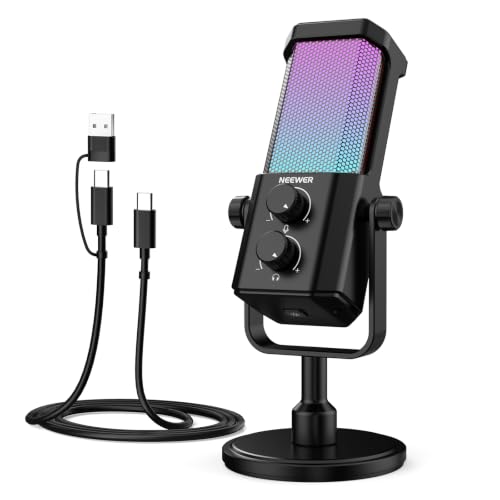
- Plug and play desktop microphone: 2 in 1 USB C and A cable, no driver needed; compatible with Mac Windows computer PC laptop PS4 PS5 Android; set UM01 external desk mic as the default input on PC; some phones need OTG enabled; not for Xbox
- Clean voice with AI noise reduction: AI chip filters keyboard, fan, AC, talk noise; hold 3 s to enable mic noise reduction with green light for clearer studio level voices; metal body microphone for content creators adds durability and a pro desktop look
- Focused cardioid pro sound: Cardioid pickup records voice in front and reduces side and rear noise; 48 kHz / 24 bit, 20 Hz to 20 kHz, -36 dB sensitivity, 84 dB SNR, and 120 dB max SPL, keep sound natural, detailed, and low distortion for loud speaking
The NEEWER UM01 earns the sixth slot for gamers who specifically want noise-reduction tools in a straightforward USB microphone.
Why it wins: It combines a cardioid condenser capsule with AI noise canceling, mute control, RGB lighting, music-sync lighting, and app control.
That makes it particularly interesting for gaming setups where PC fans, keyboard noise, or other steady background sounds are difficult to control physically.
It supports Android, Windows PC, Mac, PS4, and PS5 according to the listing.
Pros
- AI noise-canceling feature
- Cardioid pickup
- Plug-and-play USB
- Mute control
- RGB lighting
- App control
- PC, Mac and PlayStation support
Cons
- Still a condenser microphone
- Noise processing does not replace good placement
- Smaller review history than long-running gaming mics
Trade-offs / Who should skip: Choose the UM01 if software-assisted noise control is important and you want an uncomplicated USB gaming mic.
Skip it if you prefer a completely unprocessed sound or need the stronger natural room rejection of a close-miked dynamic.
Scores: Performance 4.3/5 | Voice Focus 4.4/5 | Ease of Use 4.7/5 | Value 4.7/5
Quick Compare
- Best for noisy rooms: Shure MV7+
- Best budget dynamic: FIFINE AmpliGame AM8
- Best feature-rich USB mic: HyperX QuadCast 2 S
- Best complete boom-arm kit: FIFINE AmpliGame A6T
- Best for compact desks: COMICA Ejoy UNI S
- Best noise-reduction features: NEEWER UM01
- Best XLR upgrade path: Shure MV7+ or FIFINE AM8
- Best plug-and-play kit value: FIFINE A6T
- Best RGB-focused premium setup: HyperX QuadCast 2 S
Final Verdict
The Shure MV7+ is the strongest overall choice if your priority is keeping your voice clear in a noisy gaming room. Its dynamic design and USB/XLR flexibility make it equally suitable for Discord, competitive gaming, streaming, and a future audio-interface setup.
The FIFINE AM8 is the value alternative for gamers who want a dynamic USB/XLR microphone without paying premium prices.
For a feature-heavy USB setup, the HyperX QuadCast 2 S is the better fit, while the FIFINE A6T is particularly compelling if you need a boom arm, shock mount, and pop filter included from the start.
The COMICA Ejoy UNI S makes sense for smaller desks, and the NEEWER UM01 is the most interesting choice when built-in AI noise cancellation and app control are priorities.
As an Amazon Associate, I earn from qualifying purchases.